Location preference

Enter your country so we can show you products that are available for you.

Access Point

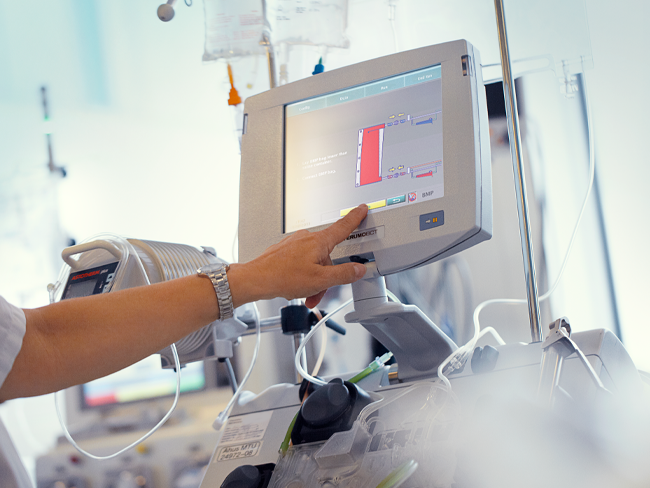
Bone marrow processing (BMP) is an important part of hematopoietic stem cell transplantation that works to concentrate the cells clinicians want and remove components that can cause complications. The Spectra Optia™ Apheresis System gives you an efficient and effective way to perform it. 

BMP on Spectra Optia can achieve greater than 97% red blood cell (RBC) reduction and more than 90% reduction in volume while preserving target cell populations, such as CD34+ stem cells and mononuclear cells.

Before you can start the processing protocol, though, you need to perform two key steps: adding ACD-A anticoagulant and transferring harvested bone marrow to the BMP bag. Read on for details on how to proceed.

BMP protocol overview

During BMP, the Spectra Optia system pumps bone marrow from the BMP bag into the centrifuge channel. The centrifuge spins the bone marrow to separate and concentrate the desired cell population and achieve a packing factor of 20. 

Spectra Optia’s Automated Interface Management (AIM™) System automatically adjusts the flow rate of the plasma pump to control the concentration of cells flowing through the collect port, based on the collection preference you set. Once cells reach the collect port, the system sounds a tone, the collect valve moves into the collect position, and the collect pump moves the target cells into the collection bag. Meanwhile, plasma and red blood cells are routed back to the BMP bag for additional processing.

To function properly, the BMP bag must contain at least 300 mL in volume with 125 mL of RBCs to establish a stable interface. 

With that foundation in mind, here’s a streamlined walkthrough of the two key preparation steps. (Note: Before these steps, filter the raw bone marrow according to your facility’s SOP.)

How to add ACD‑A to the bone marrow bag

Anticoagulation is essential to prevent clumping and promote smooth processing. The recommended ratio of bone marrow to ACD‑A is 10:1. Follow the steps below to determine the appropriate volume of ACD-A for your procedure.

  1. Determine the tare weight of the empty bone marrow (BM) bag. 
  2. Weigh the BM bag containing product. 
  3. Calculate BM volume.
        (BM bag weight – tare weight) ÷ 1.058 = BM volume (mL)
  4. Calculate the volume of ACD‑A to add to the bag.
        BM volume ÷ 10 = ACD‑A volume (mL)
  5. Add the ACD‑A to the BM bag and mix thoroughly. 
  6. Calculate total BM volume (BMV); this is the value you will enter on the BM data screen during the procedure.
        BM volume + ACD‑A volume = BMV (mL)
  7. Measure the hematocrit (Hct) after ACD‑A has been added; this ensures the Hct reflects the true product composition entering the system.
How to transfer bone marrow into the BMP accessory bag

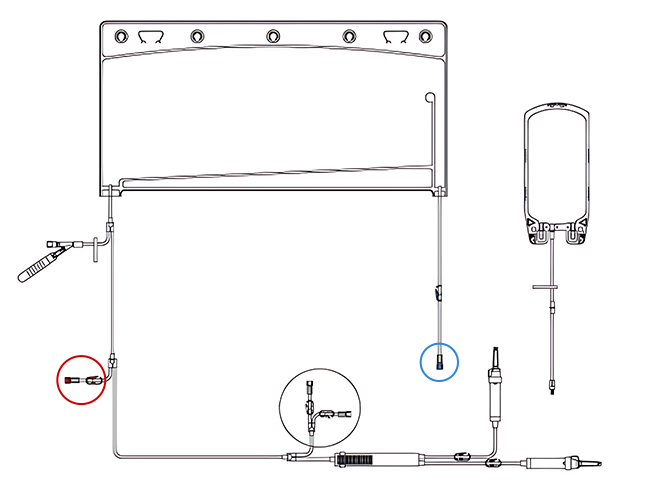
Follow the steps below when the bone marrow is ready to be transferred into the BMP bag, which is part of the Spectra Optia™ BMP Accessory Set.

Quick steps
  1. Verify the accessory set expiration date. 
  2. Open the set and unfold the BMP bag. 
  3. Clamp the following lines: 

    • Inlet line (red) 
    • Sample bulb (white) 
    • Both spike lines (white) 
    • Both luer connector lines (white) 
    • Return line (blue) 

4. Connect the BM bag to the administration line using one of these methods:

• Spike the bag with one of the spikes on the administration line (the 200‑micron filter on this line provides additional filtration if needed).
• Use the luer connector assembly on the administration line (this requires an external filter if additional filtration is needed).

5. Unclamp the selected line.

6. Hang or hold the BM bag above the BMP bag and allow it to drain into the BMP bag. 

7. Seal the administration line below the luer connector on the inlet line. 

8. Remove and discard the BM bag and administration line per your facility’s SOP. 

You’re ready to process

With anticoagulation complete, hematocrit measured, and the bone marrow transferred into the BMP bag, the product is fully prepared for processing on Spectra Optia. 

If you have questions about these preparation steps or the BMP protocol itself, review your Spectra Optia operator’s manual or contact your Terumo Blood and Cell Technologies representative.


Sources

Terumo Blood and Cell Technologies. Spectra Optia Apheresis System Operator’s Manual. Part no. 1000036875. August 2023.

Terumo Blood and Cell Technologies. Bone Marrow Processing brochure insert. Part no. TS-OPTI-01590. 2023.


Related Articles

To top