Location preference

Enter your country so we can show you products that are available for you.

Access Point

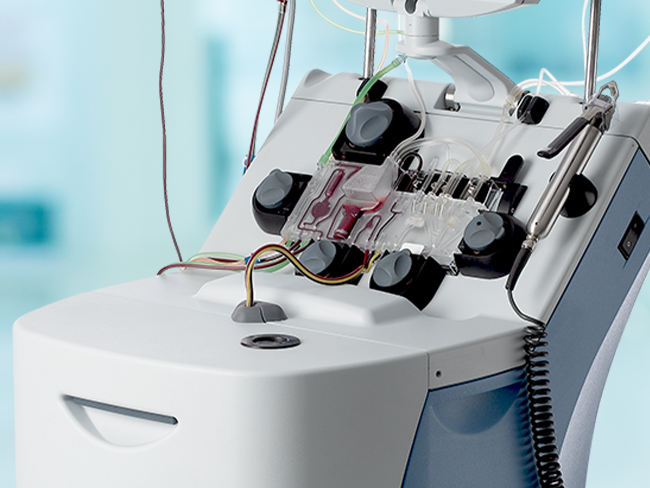
As the season shifts and many of us turn to fresh starts and spring cleaning, this is a great time to give your Spectra Optia™ Apheresis System a refresh, too.

Every day, Spectra Optia plays a vital role in patient care, and behind its advanced technology lies a simple truth: Cleanliness is safety. Dirt, residue, or infectious substances can compromise performance and put patients at risk. That’s why proper cleaning and disinfecting aren’t just routine — they’re essential. Here, we share some tips to help you keep your device clean and performing at its best.

The first rule: Power down

Before you begin, turn off the Spectra Optia system. This simple step prevents electrical shock and protects the equipment. When dealing with surfaces exposed to blood, remember: Your safety matters, too. Use appropriate protective measures to avoid exposure.

Choose wisely: Compatible solutions

Not all cleaning agents are created equally. Harsh chemicals can damage sensitive components. Stick to the recommended options below. The following solutions have been verified to be compatible with the materials on the Spectra Optia system.

Cleaning solutions

  • Mild detergent (like dishwashing liquid)
  • 70% isopropyl alcohol
  • Water

Disinfecting solutions

  • 0.63% sodium hypochlorite
  • 70% isopropyl alcohol
  • 0.50% ammonium chloride

If the disinfecting solution used by your facility contains an active ingredient that is not on this list, test the solution before use by applying it to an inconspicuous area on the system to confirm that it does not damage or discolor the system.

Tools of the trade

Gentle is the watchword. Avoid abrasive brushes or sharp objects. Instead, opt for materials such as:

  • Gauze pads 
  • Soft, lint-free cloths
  • Cotton swabs
  • Premoistened wipes with approved solutions


Routine matters

Cleaning isn’t one-size-fits-all. Some components need attention after every procedure, others weekly or monthly. See the table for our suggested cleaning schedule.

Component

Cleaning solution, drying, notes

Clean after each procedure

Clean weekly

Clean monthly

System surface 

Mild detergent, air-dry 

✔ 

Touch screen 

Mild detergent, dry with gauze 

✔ 

Front panel sensors 

Water only, air-dry 

✔ 

Front panel detectors 

Water only, air-dry 

✔ 

Front panel valves 

Mild detergent, air-dry 

✔ 

Front panel pumps 

Mild detergent, air-dry 

✔ 

Centrifuge filler 

Mild detergent, air-dry 

✔ 

Aperture plate and 
optical reference 

Water only, air-dry 

✔ 

Fluid leak detector

Mild detergent, dry with gauze 

✔ 

Covers on AIM system lights 

Water only, dry with gauze 

✔ 

Seal Safe jaw cavity

70% isopropyl alcohol, dry with a cotton swab 

As needed

As needed

As needed

Seal Safe sealer head

70% isopropyl alcohol, dry with a cotton swab, replace the splash guard

✔ 

AIM: Automated Interface Management (AIM) System; Seal Safe: Seal Safe System.


Details count
  • Touch screen: Wipe gently and dry immediately.
  • Front panel: Clean spills promptly — hidden residue can disrupt performance.
  • Sensors and detectors: Lower the cassette tray for access, then clean and dry.
  • Pump rotors: Remove, clean, air-dry, and reinstall correctly.
  • Centrifuge chamber: Clean the filler, aperture plate, and AIM system light covers with care.
Quick tips for cleaning and disinfecting
  • Always power off the system before cleaning
  • Use only approved cleaning solutions: Mild detergent, 70% isopropyl alcohol, or water
  • Use only compatible disinfecting solutions: Sodium hypochlorite (0.63%), ammonium chloride (0.50%), or 70% isopropyl alcohol
  • Avoid abrasives: Stick to gauze pads, lint-free cloths, and cotton swabs
  • Follow the schedule: After each procedure, weekly, or monthly as recommended
  • Test unfamiliar solutions on an inconspicuous area first
  • Perform preventive maintenance every six months to keep your system in top shape

For additional information on maintaining the Spectra Optia system, please refer to chapter 16 in your operator's manual or contact a Terumo Blood and Cell Technologies specialist.

Source:

Terumo Blood and Cell Technologies. Spectra Optia Apheresis System Operator’s Manual. Part no. 1000036875. August 2023.

To top